
Suggested Movies to Watch via Web Scraping
In this tutorial, we’ll be discussing how to scrape the web in order to find new shows or movies to watch based on what you currently like!
Here’s a link to my project repository as well.
Initialization
First find the IMDB page of your favorite movie or TV show. I decided to pick my favorite show ‘Community’ for this one:
https://www.imdb.com/title/tt1439629/
Next, open up your terminal or command prompt and type:
conda activate PIC16B
scrapy startproject IMDB_scraper
cd IMDB_scraper
For Windows users, you may have to open up Anaconda prompt instead of command prompt for this to work properly. If you do this then there is no need to type in ‘conda activate PIC16B’ anymore as you’ll already be in the correct environment.
Now we have just created our project file for our scraper.
Next, we’ll have to create a new file inside the spiders directory of our IMDB_scraper project directory.
import scrapy

class ImdbSpider(scrapy.Spider):
    name = 'imdb_spider'

    start_urls = ['your_start_url']
Web scraping functions
In order for us to find new recommended shows or movies we must first write three different parse functions which will help us.
Here’s how our first parse() function looks like:
def parse(self,response):
        """
        parses through the imdb page of the given show or movie.
        returns a parse request for the full cast & crew page on imdb
        """
        cast_and_crew_page = 'fullcredits'
        cast_url = response.urljoin(cast_and_crew_page)
        yield scrapy.Request(cast_url, callback = self.parse_full_credits)
This first parse function accesses our given url and then finds the url leading to the full credits page. The newly found url is then given to our next parse function.
def parse_full_credits(self, response):
        """
        starting from the cast & crew page this function will crawl to the pages of listed actors
        """
        #a list of the partial urls for each actor
        actors_suffixes = [a.attrib['href'] for a in response.css("td.primary_photo a")]
        #the first part of the complete url for the actor
        prefix = "https://www.imdb.com"
        #the full url to the actor
        actors_url = [prefix + suffix for suffix in actors_suffixes]
        #crawling to each of the actor's page
        for url in actors_url:
            yield scrapy.Request(url, callback = self.parse_actor_page)
Our second parse function, parse_full_credits() accesses every actor listed in the given movie or show. A complete url is assembled for the actor’s imdb page and then passed onto the next parse function.
def parse_actor_page(self, response):
        """
        starting from the actor's page, this function will yield a dictionary where the
        keys are the names of the actors and the values are a list of the films and shows
        they have been on
        """
        actor_name = response.css("span.itemprop::text")[0].get()
        filmography = []
        filmography_listings = response.css("div.filmo-row")
        #for loop to go through each of the actors' work
        for filmo in filmography_listings:
            #seeing what the actor's role was in a certain project
            role = filmo.css("::attr(id)").get()
            #checking to see if they acted in said project
            if role[0:3] == 'act':
                media_name = filmo.css("a::text")[0].get()
                #removing any commas since we are putting the results in a csv file
                media_name = media_name.replace(",","")
                #adding the filmography to a list
                filmography.append(media_name)
        #what will be written into the csv file
        yield{"actor": actor_name, "movie_or_TV_name": filmography}
This final parse function, parse_actor_page(), creates a dictionary of the actor’s names as keys and their filmography as the values. A for loop is used to go through each of the actor’s credits and their roles in the credit is checked. If their role in the work is for acting then it is put into our filmography list. Finally we yield a dictionary of our final results.
Seeing our results
Opening up your terminal or Anaconda prompt, enter the following command which will scrape our given movie or show’s IMDB page:
scrapy crawl imdb_spider -o results.csv
After a few minutes scraping, a csv file of our dictionary will be created in our IMDB project directory folder.
Open it up and see whats inside!
Visualizing our results
Now opening up your python editor of choice, lets create a visual for our csv results:
import pandas as pd
import numpy as np

filmography = pd.read_csv("results.csv")
#turns our pandas database into a list of all the works of the actors in our given show or film
all_works = [val.strip() for sublist in filmography.movie_or_TV_name.dropna().str.split(",").tolist() for val in sublist]
#creates a dictionary counting frequencies of each work
counts = {x:all_works.count(x) for x in all_works}
#sorts our dictionary in descending order
sorted_counts = dict(sorted(counts.items(), key=lambda x:x[1], reverse = True))

#creates a data frame of our sorted dictionary with column 0 being the name of the show or movie and column 1 being the number
#of shared actors
data_items = sorted_counts.items()
data_list = list(data_items)
df = pd.DataFrame(data_list)
df.rename(columns = {0 : "Movie or TV Show", 1: "Number of shared actors"}, inplace = True)
df
Here’s how the table of the show ‘Community’ looks like:
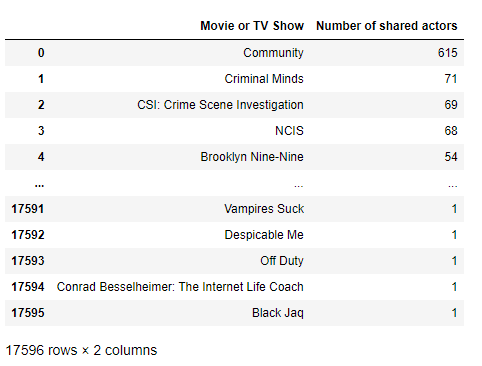
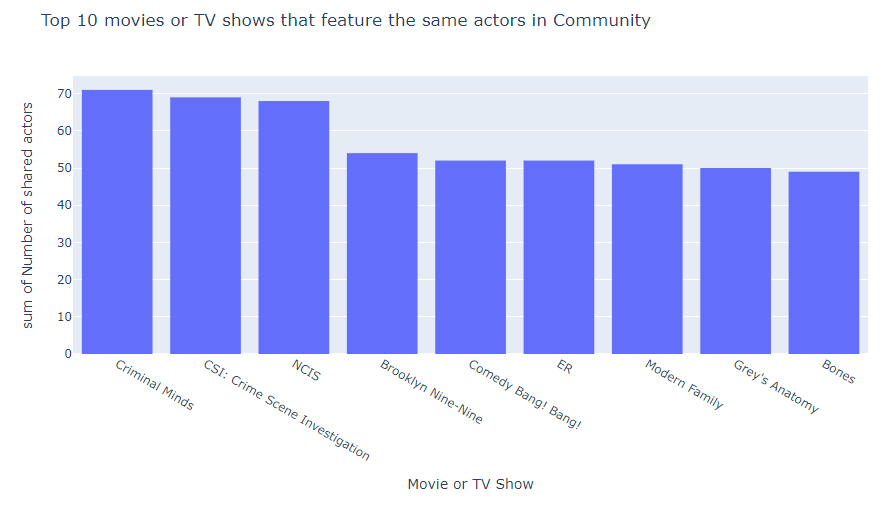
Now using Plotly, lets create a histogram of the top 10 movies or shows that feature the same actors as our starting movie or show:
import plotly.express as px
fig = px.histogram(data_frame = df[1:10],
                   x = "Movie or TV Show",
                   y = "Number of shared actors",
                   title = "Top 10 movies or TV shows that feature the same actors in Community")
fig.show()
Thank you for reading along. Hopefully you have learned a lot and also have found some new shows or movies to watch!